
An allowance system that pays out without you having to do math.
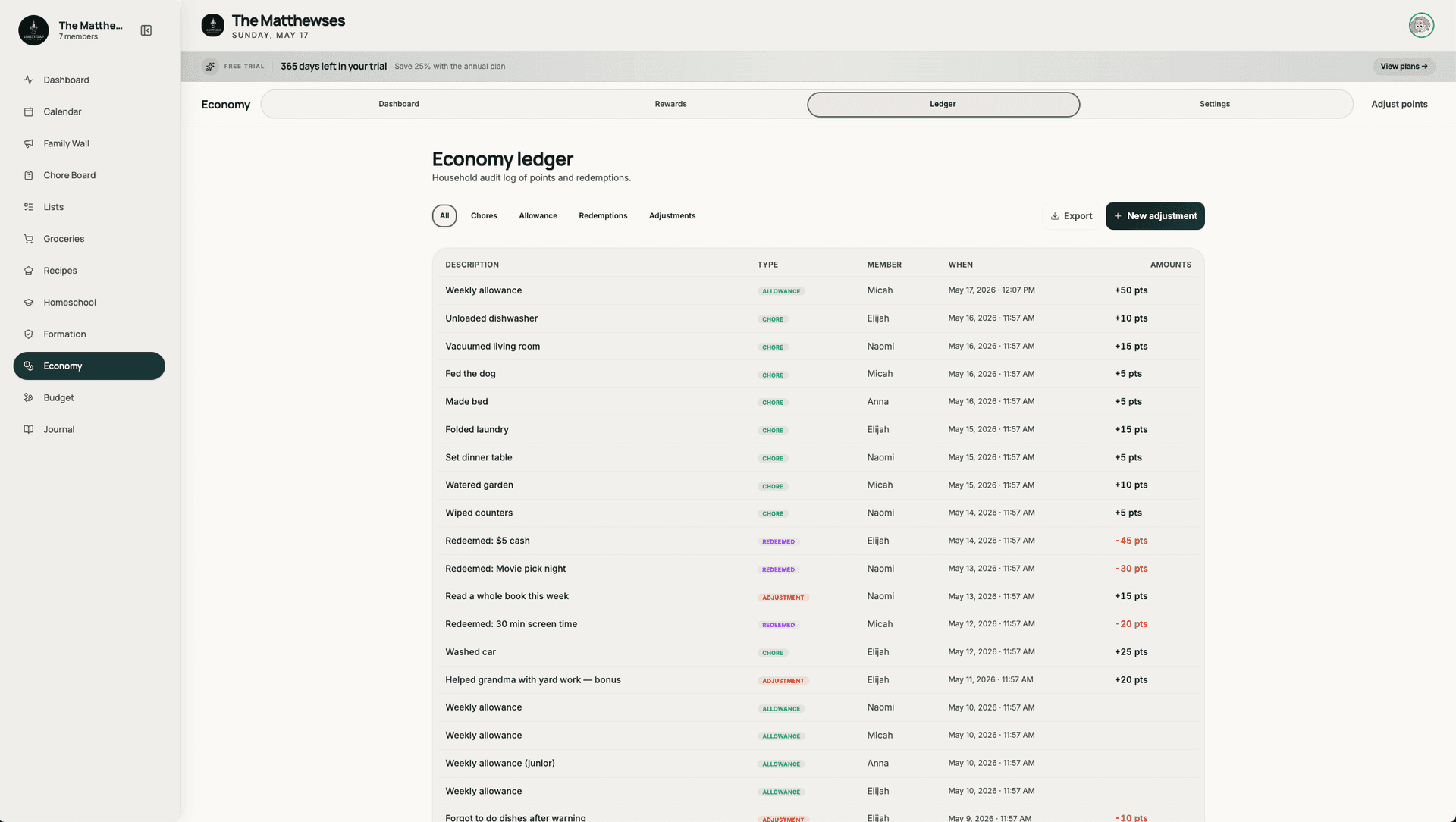
Most parents pay weekly allowance in cash they don't always have, in front of kids who don't always know what they earned. Lightstead's allowance tracker turns chores into points, points into a balance, and the balance into either a weekly cash payout or rewards from a family-defined catalog. Kids see what they earned and what's available; parents review claims; the math is the math. No more Sunday-morning quarter scrounging.
- PointsEconomy — no fake currency, no in-app coins
- WeeklyAuto-payout — to bank, to cash, or to reward catalog
- ParentReview — every claim, every redemption, your approval
Every chore has a point value. Late chores pay less.
Each chore template carries a point value the parent sets. Completing a chore earns points; missing it earns zero; completing it late earns a parent-set percentage (0%, 50%, 100%). The economy is transparent — kids see what each chore is worth before they take it on.
- Per-template point values
- Per-template late-completion behavior (zero / partial / full credit)
- Weekly challenge bonus payouts
- Pool chore rewards (any eligible kid can claim)
Approve, reject, or adjust — in two taps.
Completed chores flow into the parent review queue. Approve and the points post. Reject with a brief note and the kid sees it on retry. Adjust with a partial-credit override for unique cases. No notification triage, no app-switching — the queue is one window in the parent dashboard.
- One-tap approve/reject
- Per-instance reject note
- Partial-credit override
- Bulk review at end of day
Auto-payout — to cash, bank, or rewards catalog.
Every Sunday (configurable), the week's points convert. Three modes: cash payout (you give them money), bank deposit (mark transferred when you do), or reward catalog (kid picks items the family agreed on — extra screen time, a special outing, a small purchase). Mixed modes work too — half cash, half catalog.
- Configurable payout day
- Cash / bank / catalog modes
- Per-kid mixed-mode settings
- Payout history for transparency
Family-defined rewards — not generic in-app currency.
The reward catalog is what your family says it is. Some families catalog screen time blocks ($1 per 30 minutes). Some catalog physical items (a Lego set every 200 points). Some do experiences (a one-on-one outing with a parent for 100 points). The catalog is editable per household — no canned rewards that don't fit your values.
- Per-household catalog
- Tiered rewards (small / medium / large)
- Stock limits per item
- Parent approves redemptions
It works alone — but it's better with the rest.
Common questions.
How does Lightstead's allowance tracker work?
Chores have point values. Kids complete chores; parents approve them; points post to the kid's balance. Each week, the balance pays out either as cash, a bank-transfer note, or a reward from the family-defined catalog. The math is transparent and visible to the kid in real-time.
Does Lightstead use in-app currency?
No. Lightstead uses points, but points are an internal unit — they convert directly to cash, bank, or rewards based on the family's settings. There's no fake currency the kid can't actually spend, no proprietary token, no "50 stars equals one prize."
What if I don't pay weekly allowance in cash?
Three payout modes: cash (you hand them money), bank (mark transferred when you do — Greenlight, Acorns Early, GoHenry, or your own setup), or reward catalog (kid picks from family-defined rewards). Mix and match per child — half cash, half catalog is common.
Can I set different chore values for different kids?
Yes. Each kid can have their own template overrides — a 6-year-old's "clean room" might be worth 5 points; a 12-year-old's "clean room" might be worth 3 points because the standard is higher. Templates ship with sane defaults; per-kid overrides take a tap.
How does late-chore payout work?
Each template's late-completion behavior is parent-configurable — zero credit, partial credit, or full credit. A chore completed late at partial credit pays a reduced point value. Lightstead knows the household timezone and applies the configured behavior automatically.
Can my kid see their own balance?
Yes. The kid view has its own dashboard showing current balance, this-week's-earnings, and the reward catalog. They see in real-time as parents approve their work. The transparency is half the point of running a real economy at home.
Does the allowance tracker work without chores?
Sort of. You can add manual point grants ("good behavior this week — 10 points") without chores being the source, but the chore economy is the structural backbone. Pure manual allowance works but loses the kid-visibility-into-effort that makes the system motivating.
What ages does this work for?
Roughly 5 to 18. Younger kids do better with smaller catalogs (3-5 reward options, weekly cash) and simpler chores. Older kids handle more sophisticated catalogs (larger savings goals, deferred rewards) and longer planning horizons. Lightstead adapts to both.
Allowance that pays out without the Sunday math.
14-day free trial. Points, chores, parent review, weekly payouts — all in one household workspace.
Start free trial