Every list your family makes — in one place that doesn't lose them.
Packing for the trip, books to read aloud, movies to queue, gift ideas for grandparents, gear for camping. Each list carries the right type, the right people, the right cadence. Reusable saved lists pour pantry staples into a grocery run; templates start a new list from one you've already perfected; the hub pins your most-active list on top so you don't lose it.
- ∞List types — packing, books, movies, gear, gifts, anything you name
- PinOne featured list per household; the rest stay one tap away
- PourSaved lists — reusable item bundles you pour into any list
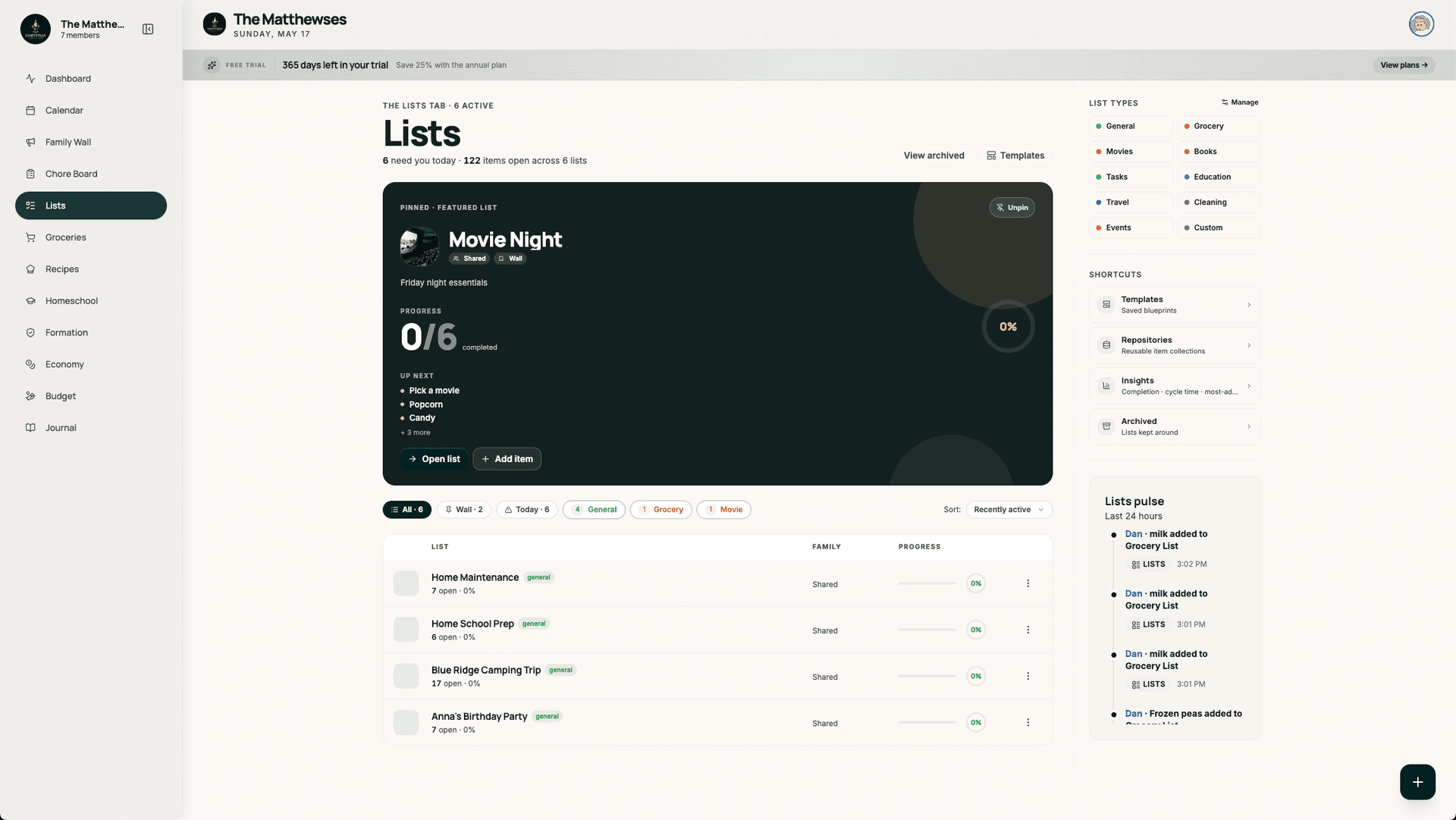
One hub. Featured pin on top. Everything else in a dense table.
The hub starts with a stat block ("need you today"), pins your most-recently-updated list as a hero card, and stacks the rest in a sortable table below. Filter by list type, a search box, and a sidebar with Pulse signals so the lists that need attention rise.
- Featured pin auto-selects the most active list
- Filter by list type
- Archived view with one-toggle restore
- Pulse sidebar — lists that need action rise to the top
Reusable item bundles you pour into any list.
Pantry staples are a saved list. Camping gear is a saved list. The Easter-egg-hunt master list is a saved list. When you start this week's grocery run, you pour the pantry one in and pad with what you actually need. Each saved list holds notes, quantities, and tags — and lives outside any single list.
- One saved list, many lists
- Per-item notes + quantities
- Update the saved list, every future pour stays current
- Parent-owned, child-readable
Start from a list you already perfected.
The template library has system defaults (packing, birthday party, school supplies) and your own saved templates — turn any list into one with a click. Most-used templates float to the top, system vs. yours are tagged. Use-count tracking helps you see which templates earn their slot.
- Built-in + your own templates
- Start a new list from a template in one tap
- Use-count surfacing for hero placement
- Categories: packing, party, school, project, more

Movies get rated. Books get rated. Gear doesn't.
List types are first-class — each one carries its own affordances. Movies and books support an optional 1-5 rating after you check them off; gear lists carry pack/unpack toggles; gift lists hide other family members' picks unless the giver wants to coordinate. Define your own type if the defaults don't fit.
- Per-type field configuration
- Optional ratings — opt-in per type
- Custom list types per household
- Color-coded labels per list type
It works alone — but it's better with the rest.
Common questions.
How is Lightstead's lists module different from Apple Reminders or AnyList?
Two things. First, every list type is first-class — a books list and a packing list behave differently (ratings vs. pack toggles), not just visually but in what each one lets you do. Second, saved lists let you pour reusable item bundles (pantry, camping gear, party essentials) into any new list, so you stop re-typing the same 30 things every time.
Can kids own their own lists?
Yes. Each list has a parent or child owner. Child-owned lists are scoped to the household but managed by the kid; parents can read but not edit unless explicitly invited. Books-to-read, movies-to-watch, and personal wishlists are the usual kid-owned types.
Does the grocery list live in the lists module?
Yes, but with its own dedicated entry point at /lists/grocery and its own in-store mode. The grocery list shares list-module infrastructure (types, repos, sync) but adds aisle-aware sorting and a checkout flow built for actually shopping. See /family-groceries for the full grocery module.
What's a saved list, exactly?
A reusable bundle of items that isn't itself a list. Pantry staples (flour, sugar, oils, spices) is a saved list. Camping gear (tent, stakes, sleeping bags, headlamp) is a saved list. When you start a new list for this weekend's camping trip, you pour the camping-gear one in, pad with what's specific, and head out. Update it once and every future pour gets the new version.
Can I export my lists?
Yes. Each list has a plain-text export (markdown checklist) and a CSV export for the data-minded. Your lists are yours — not locked in.
Does it work offline?
Read-only on the web (the last load stays cached); the mobile app supports offline edits with sync on reconnect. The grocery list specifically is built for poor-signal grocery aisles.
Stop re-typing your packing list every July.
14-day free trial. Lists, saved lists, templates, ratings — all in one household workspace.
Start free trial