The family organizer that does more than a calendar.
Most family organizer apps are calendars with a chore list bolted on. Lightstead is built the other way around — calendar, chores, shared lists, grocery, recipes, meal planning, allowance, and homeschool records all live in one household workspace, and each one knows about the others. The Tuesday soccer event links to the family calendar; the post-game pizza shows up on Tuesday's meal plan; the receipt lands on the family budget. One app, one household, every part talking to every other part.
- 7Modules — calendar, chores, lists, recipes, meal plan, allowance, homeschool
- 1Subscription — $9.99/mo or $89.99/yr for the whole household
- Multi-parentWorkspace — both parents in the household co-manage
Every part of the family workspace talks to every other part.
A calendar event for soccer practice can link to a chore ("bring snacks"), a list ("team gear"), and an attendee (the kid). A meal plan recipe sends its ingredients to the grocery list. An allowance payout reflects this week's completed chores. Those connections are the difference between an organizer that helps and an organizer that's just six separate to-do apps in a trench coat.
- Event → chores, lists, attendees, meals
- Recipe → grocery list rows, duplicates merged
- Chore completion → allowance ledger
- Homeschool field trip → calendar event + photo log
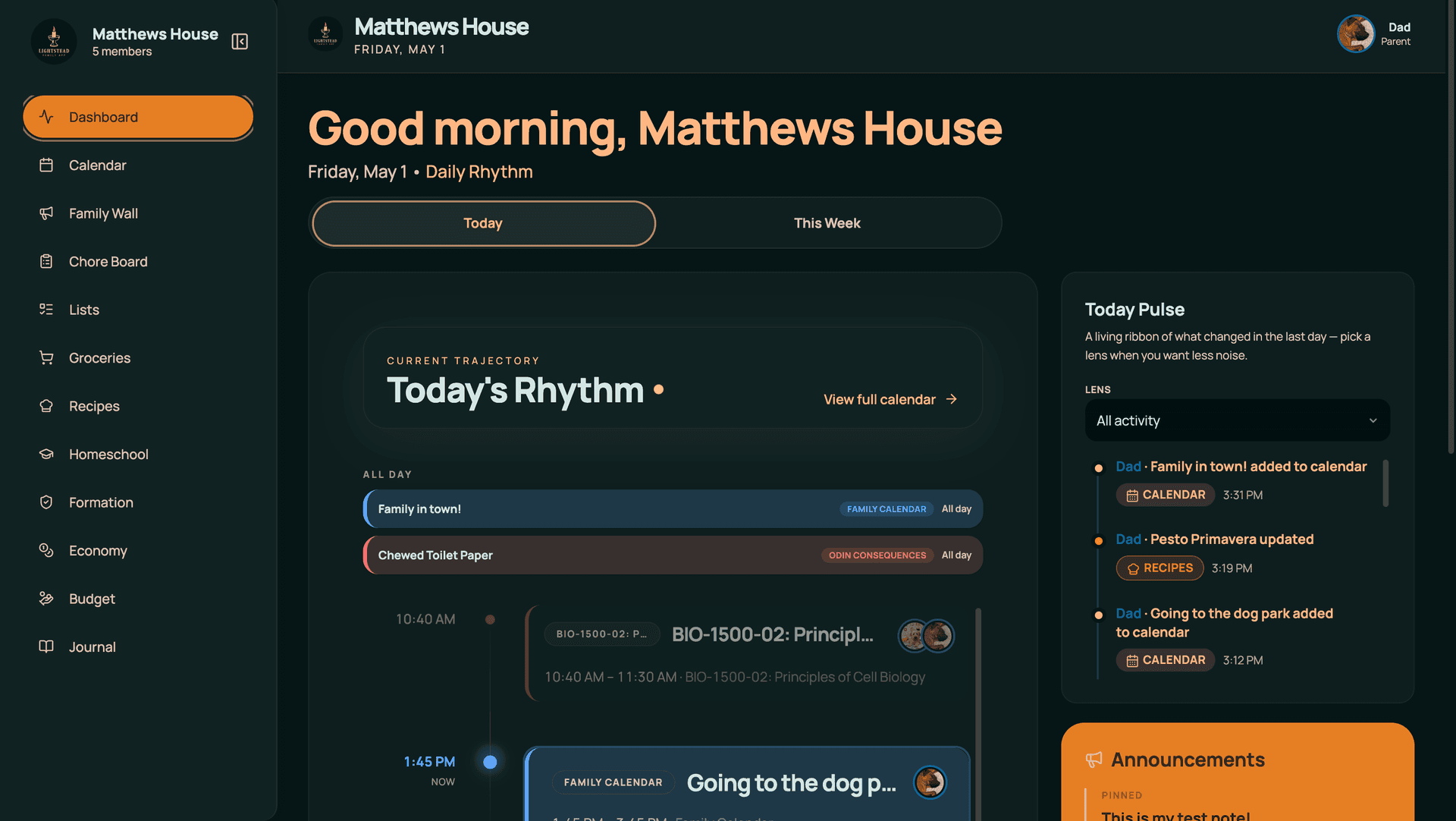
Two parents in one household — both co-manage.
Both parents in the household workspace co-manage the family — calendar events, chore approvals, homeschool records, shared lists. Each parent connects their own Google calendar (up to 4 accounts per household), so personal work calendars stay personal while shared events show up for both parents.
- Two-parent default workspace
- Per-parent Google calendar slot
- Family Mode for shared kitchen devices
- Parent unlock for sensitive operations
Kids see what's theirs — not the whole stack.
Parents see everything. Kids see their chores, their points, their reading log, their next event. The kid view is its own screen — not a stripped-down parent view, but a kid-shaped view of what kids actually care about. Approve-needed actions flow back to the parent dashboard. Restricted data (estate, finances, formation notes) never crosses the line.
- Per-child custom view
- Touch-friendly mobile-first kid screen
- Parent unlock for sensitive operations
- Family Mode for shared devices
From signup to organized in a single sitting.
14-day free trial. Add children, connect a Google calendar, set up a chore or two, and the dashboard becomes useful. You don't need to design the whole system in week one — most families add modules (homeschool, recipes, meal plan) over the first few weeks as the rhythm settles in.
- Onboarding wizard
- Sample chore templates
- Sample meal plan
- Per-module toggles
It works alone — but it's better with the rest.
Common questions.
How is Lightstead different from Cozi?
Cozi is, at its core, a shared family calendar with lists. Lightstead is calendar-plus-list-plus-chores-plus-meals-plus-allowance-plus-homeschool, with cross-links between each. Cozi is broader-audience and lighter-touch; Lightstead is more depth per module, especially for families who homeschool or run chore-and-allowance economies.
Does Lightstead replace Google Calendar?
No — it syncs with Google so your work meetings stay on your work calendar. The family layer sits on top. Up to 4 Google accounts per household with per-calendar sync mode (import / push / both). Most families keep Google for personal and Lightstead for family-coordination.
Can both parents use Lightstead?
Yes — Lightstead is built household-first. Both parents in the household workspace co-manage calendar, chores, lists, homeschool records, and everything else. Each parent connects their own Google calendar (up to 4 accounts per household). Cross-household shared workspaces (e.g., for separated co-parents in two homes) aren't supported today.
What ages does the family organizer work for?
Kid-facing surfaces work from ~5 years old (chore charts, simple reading logs) through high-school (homeschool transcripts, allowance management). The parent dashboard works at any age. Most Lightstead households have kids spanning multiple grade levels.
Can I use Lightstead without homeschool?
Yes. The homeschool module is one of seven; toggle it off in settings if you're not homeschooling. The remaining six (calendar, chores, lists, recipes, meal plan, allowance) work fine on their own. Many Lightstead households don't homeschool.
How much does the family organizer cost?
$9.99/month or $89.99/year for the entire household — unlimited children, both parents, every module. 14-day free trial, no card required to start. Pricing is per-household, not per-user, so the cost doesn't scale with family size.
Does Lightstead work on mobile and desktop?
Yes — the web app at app.lightsteads.com works on any browser including the iPad on the kitchen counter or a phone at the store, and the native iOS app is on the App Store. The Android app's launch is ahead (the web app's mobile-responsive layout already covers Android phones). Same household and data everywhere.
Is Lightstead good for homeschool families specifically?
Yes — it's why Lightstead exists. The homeschool module covers all 51 states: 43 with deep state-specific guidance (PA portfolios, NY's Individualized Home Instruction Plan or IHIP, FL evaluations, etc.) and 8 with basic compliance summaries (mostly low- or no-notice states where there's less paperwork to walk you through). It integrates with the rest of family life — a homeschool field trip is a calendar event with a photo log; a co-op snack day is a calendar event with a chore. See the homeschool module page for details.
One family workspace, every part connected.
14-day free trial. Calendar, chores, lists, recipes, meal plan, allowance, homeschool — together, in one household account.
Start free trial